· 8 min read
What Risk Management Software for Transportation Should Track
By Michael Sidler, Founder, RISE
The National Safety Council's position statement on near miss and hazard reporting notes that tracking near misses "through a centralized, company-wide database was found to be a best practice" among its award-winning companies. Risk management software for transportation should pull every hazard, near miss and incident from drivers, docks and yards into one record set, rank each one by severity and probability, give every fix a named owner and a due date, prove the fix worked, and show leadership where risk is building by location.
Most fleets already hold pieces of this. Claims history sits with the broker. Telematics alerts land in a dashboard someone checks on Mondays. The cracked trailer floor a driver flagged at a customer site lives in a dispatcher's text thread. Each of those is a record. None of them is a system.
Where should driver, dock and yard reports land?
In one place, filed from wherever the person is standing. A driver waiting at a shipper's dock with a dead dock lock will not hunt for a login. A forklift operator who nearly clipped a picker will mention it at shift change, and by lunch it is a story instead of a report.
When you look at fleet safety management software, check four things at the reporting end. The form should open in a phone browser without an account. The QR code should go where people actually stand: the driver lounge, the time clock, the cross-dock doors, the fuel island. The reporter should be able to attach a photo. And they should be able to choose to file anonymously. A driver reporting pressure from dispatch to run late may not want a name on it.
In RISE, each public form gets its own link and printable QR code, and one company poster lists every public form, so a driver, a temp on the dock or a lumper can file without an account. Each form routes to the people or groups you choose, and the submitter gets an acknowledgement email. A reviewer then triages the report as a hazard, near miss, incident, accident or not a safety issue, and sets what happens next: no further action, a safety action, a risk evaluation or an investigation. Paper never had that step. It had a tray.
You build the forms around your own operation. Conditional questions keep them short: answer yes to "was a vehicle involved?" and the unit number question appears. Tractors, trailers and forklifts go in an asset register by identifier, make, model and type, and terminals and DCs go in as locations, so the north yard's reports never blur into the south yard's.
How should the software rank risk?
On one matrix, for everything. A backing hazard at a tight customer yard, a pedestrian shortcut across a forklift lane, fatigue on overnight linehaul: these compete for the same budget and the same manager's attention, so they need the same scale. A hazard list with no ranking is a worry list.
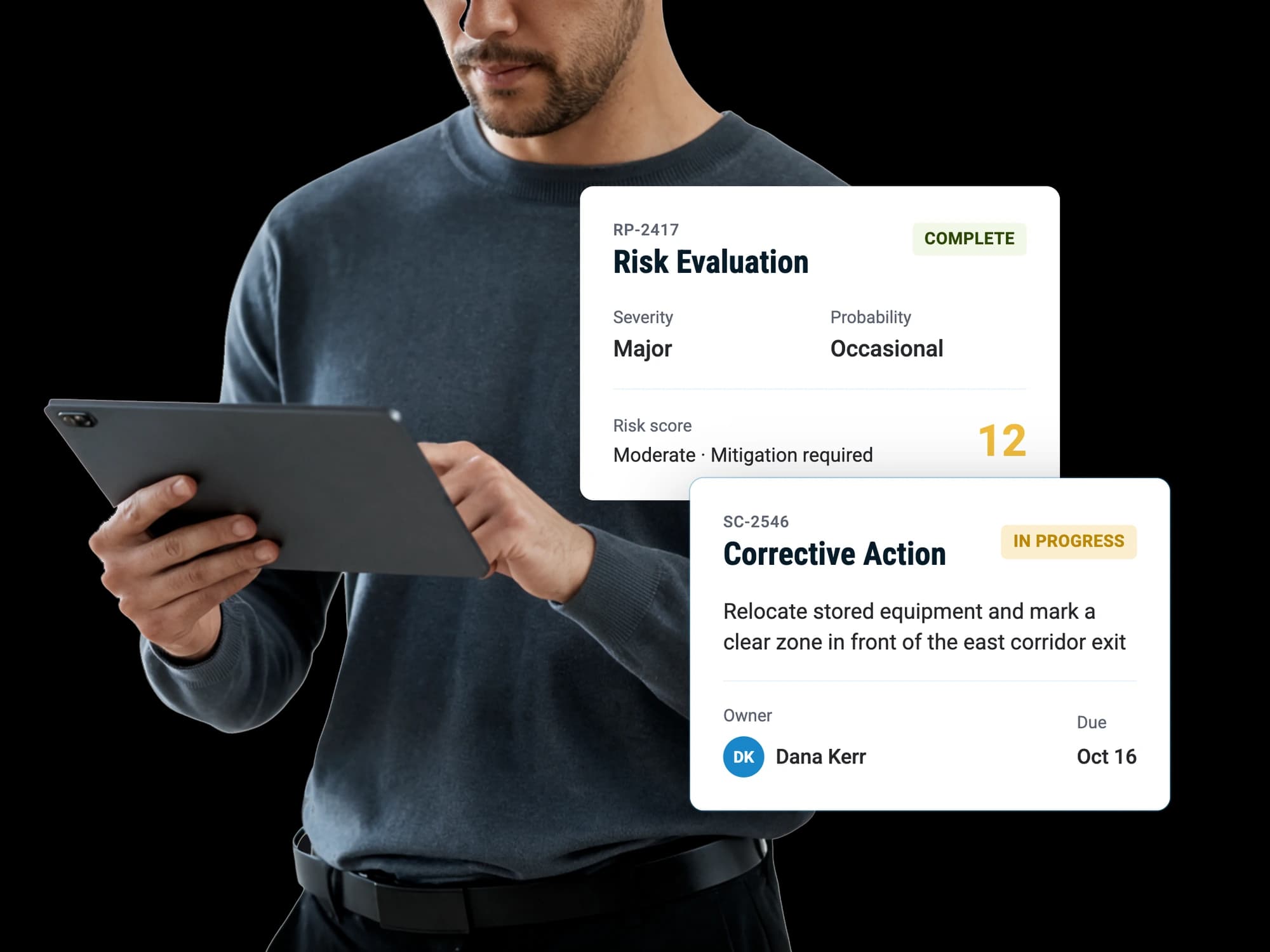
Good software records initial risk, the controls you add, the residual risk left after them, who accepted it and when, and a date to look again. In RISE, risk evaluations run in four steps (details, analysis, strategy, acceptance) on one 5 by 5 severity and probability matrix for the whole account. Administrators decide where Low, Medium and High begin and write the guidance shown for each of the 25 squares. Acceptance records the decision, the person and the date, and the re-review date is set when the evaluation is finalized. The hazard register holds each hazard with its evaluations, and the control library lets you write "spotter required for blind-side backing at customer docks" once and reuse it.
Where those Low, Medium and High lines sit is usually decided by gut feel in a conference room. Our free risk tolerance quiz walks through twelve questions and ends with two numbers to set on your own forms.
Some decisions happen before the work starts. A dispatcher weighing a winter mountain run with a newer driver needs a quick score, not a committee. RISE risk assessment forms carry points per answer with low, medium and high thresholds, and above the threshold you choose, the form can require mitigation or approval before the trip goes.
Where does telematics fit?
Telematics tells you what the truck did. The NSC's telematics page describes systems that flag speeding, harsh braking and distraction early enough for safety professionals to "intervene before those behaviors lead to crashes." That intervention is the part a safety program has to track.
Hard braking clustered on one route might be a driver habit. It might also be a bad merge or a customer yard that forces every driver into a blind-side back. The coaching session, the route change and the call to the customer are all actions with owners. When a telematics pattern points at a hazard rather than a driver, write it up as a hazard report so it enters the same queue, the same matrix and the same corrective action list as everything else. Otherwise your most expensive safety data ends at a dashboard.
What should happen after a report comes in?
A corrective action with one owner, a due date and a link back to the report that started it. "The shop will look at it" names a building, not a person.
In RISE, every task and corrective action sits in a Task Register with one named owner, a priority, start and due dates, and a link to its source: the report, evaluation, audit, inspection, safety case or meeting it came from. When a task passes its due date, the person assigned gets an overdue email. Verified closure, switched on per task, needs a note, a file or a linked record before the task closes, and records who verified it. "Closed" in a spreadsheet means someone typed closed. Closed with a photo of the new dock bumper means something.
Bigger events need more than a task. A trailer that pulled away from the dock mid-load deserves root cause work. RISE safety cases hold the root cause analysis, a correction plan with tasks, monitoring and verification, and a case cannot close without a verifier, a verification date and notes.
Scheduled checks belong in the same loop. RISE runs dock, yard and warehouse inspections from templates with required evidence per item and a linked asset or work area; findings raise corrective actions, and inspections can be set on a repeat schedule.
One habit no software replaces: read the overdue list on the weekly ops call. A terminal manager explaining an open item to peers closes it faster than any email.
What should it report back to leadership?
Trends by location and leading indicators, ahead of the quarterly injury count. The same NSC statement reports that sites with more near-miss reporting tend to have lower injury rates. So a terminal that goes quiet is a question, not a win.
Useful indicators for a fleet or DC network: near-miss reports per location per month, days to close corrective actions, overdue actions by owner, and inspections completed against inspections scheduled. RISE shows reporting charts and trends, and safety objectives carry indicators and targets that recalculate nightly. Crossing a target records a breach and emails the right people. When a shipper or insurer asks for proof, evidence exports as a zip.
For managers who would rather ask than build a chart, there is an AI assistant, a paid add-on available on any plan and most useful once your evaluations and corrective actions live in RISE, that answers questions about your own records, such as "which terminal has the most overdue corrective actions this quarter?" It reads the data in your system and provides detailed insights and a report that answers that question with links to the source records.
Where to start this month
Pick one terminal or DC and run the loop there first.
- Gather the last 90 days of incidents, near misses and driver complaints from wherever they live: email, claims files, the telematics coaching log, the whiteboard in dispatch.
- Score the top ten on one severity and probability matrix, and settle the Low, Medium and High lines while you do it.
- Give each one a named owner, a due date and a person who checks the fix.
- Post one reporting QR code in the driver lounge and one at the dock doors, and name who triages new reports and how fast.
- Put the overdue list on the weekly ops call and keep it there.
If you are comparing tools, our free safety software checklist scores fifteen questions on whether software does what your operation needs, section by section.
RISE records reports from drivers and dock crews, ranks them on your matrix, and tracks each corrective action to a verified close. To see it with your own locations and equipment, book a demo.
Sources
- National Safety Council Position/Policy Statement #131: Near Miss and Hazard Reporting
- National Safety Council: Fleet Telematics, Turning Data into Safer, More Efficient Operations
Questions people ask
Is fleet safety management software the same thing as telematics?
They do different jobs. Telematics measures what the vehicle and driver did on the road, while safety management software holds the reports, risk rankings and corrective actions that follow. Most fleets need both, with a clear habit for turning a telematics pattern into a written hazard report when it points at something beyond one driver.
Should warehouse hazards and road hazards share one risk matrix?
One matrix works better, because it lets you compare a forklift lane problem against a backing hazard on the same scale. Two matrices give you two top-ten lists and no way to decide between them. Write the guidance for each square in words both a dock supervisor and a fleet manager would use.
Is a rising near miss count at one terminal bad news?
Usually it is a sign people trust the system enough to use it. A terminal that suddenly reports more is often a terminal where someone fixed what the last report raised. Watch severity and repeat hazards alongside the count, and worry more about the location that has gone silent.
Should drivers be allowed to report anonymously?
Offering the choice brings in reports you would otherwise never see, especially ones about dispatch pressure, customer sites or a supervisor. Anonymous reports are harder to follow up, so ask for as much detail as possible in the form itself. Most reporters will put their name on it once they see reports lead to fixes rather than discipline.
What drives the cost of risk management software for a fleet?
The size of the operation drives most of it: number of users, locations and assets. Which modules you need matters too, from reporting alone up to risk evaluations, audits, objectives and safety promotion. Implementation, training and any add-ons round it out, so ask each vendor to price against your actual terminal and headcount.